Document My Clicks for Salesforce Now on Microsoft Edge and Firefox

Steps Click through it once. Get the guide.

A browser side panel that lives next to Salesforce. Click through a task once and Steps hands you a step-by-step guide with screenshots: every click a numbered step, with a picture before the click and a picture of the result. Field values are covered in every picture by default, so record data does not end up in training material. Nothing leaves your browser.

Available now for Microsoft Edge and Firefox. Chrome is on the way. Free to record and export. PRO is $19 once.
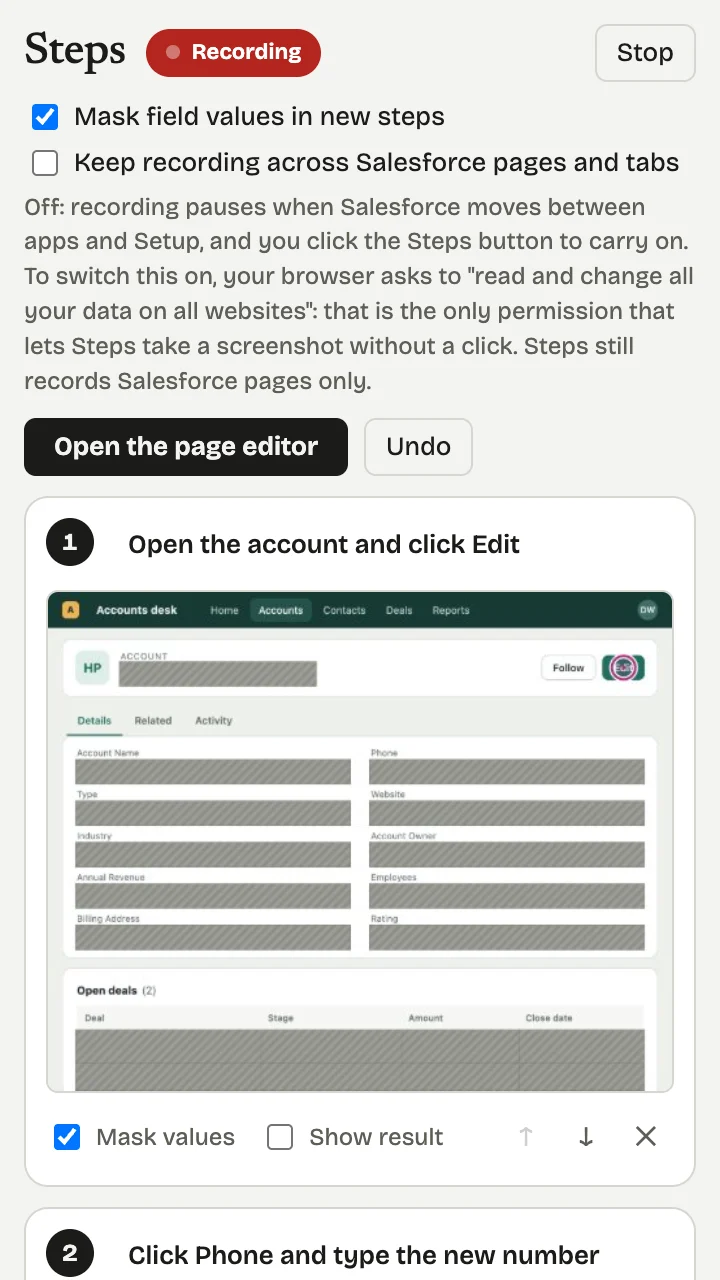
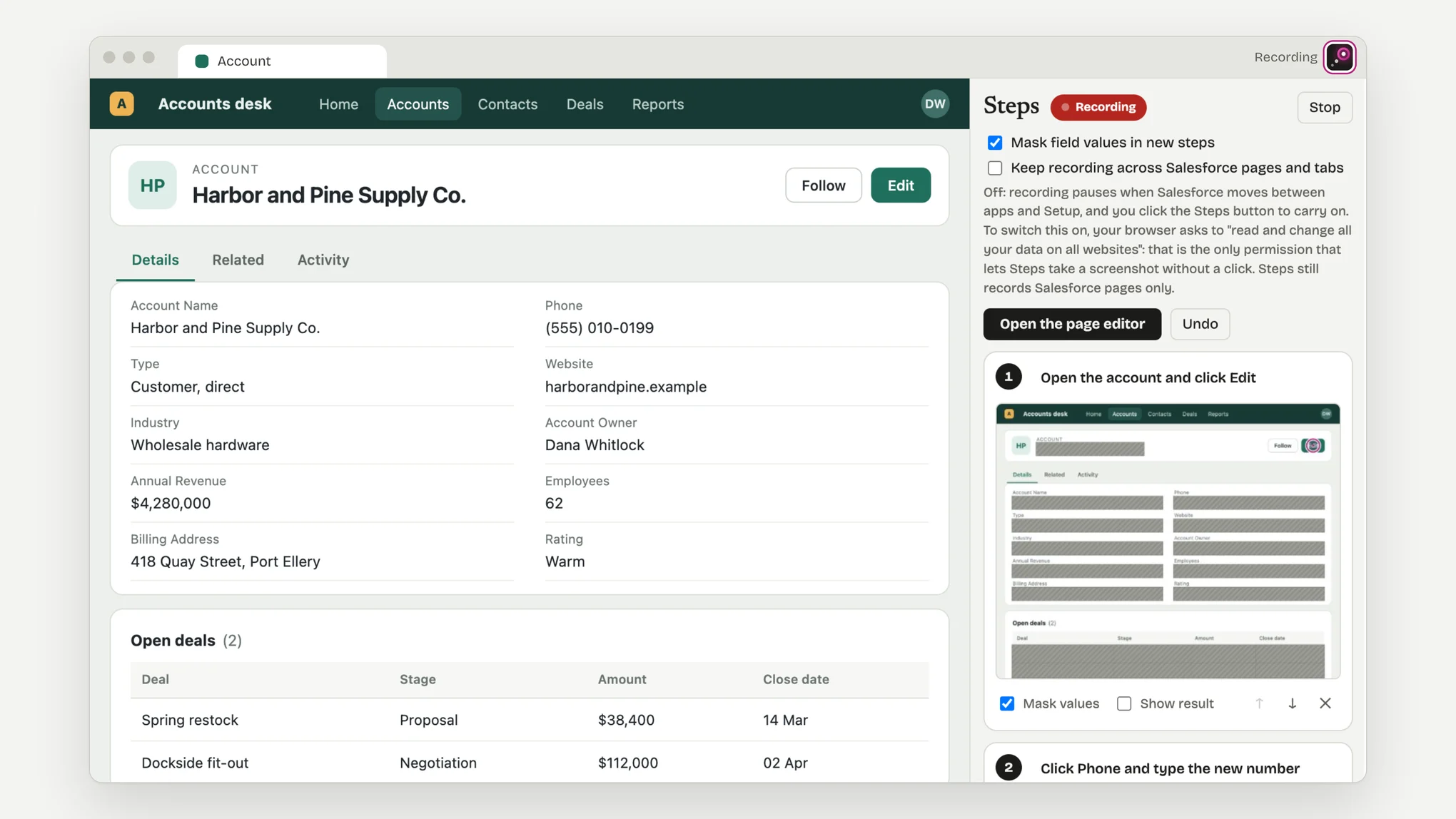
The Steps side panel while recording: step 1, Open the account and click Edit, with its picture and field values covered by striped masks; step 2, Click Phone and type the new number
The side panel while you record: each click lands as a numbered step with its picture.

Steps in 39 seconds.

One click-through, start to finished guide.

On a phone? Watch the vertical cut.

Click through it once.

Open Steps next to Salesforce, press record, and do the task the way you always do. The guide writes itself while you click.

A sample account record page with the Steps side panel beside it, recording: step 1, Open the account and click Edit, already has its picture
A sample record page with Steps recording beside it. The names and values are invented.
EVERY CLICK, NUMBERED

Before and after, for each step

Steps records each click as a numbered step with a picture before the click and a picture of the result. The reader sees what to click and what should happen next.

CAPTIONS WRITTEN FOR YOU

The label is the caption

The caption comes from the label of what you clicked: Click Save, Open Stage. No typing up what you just did.

MASKED BY DEFAULT

Record data stays out of the pictures

Field values are covered in every picture by default, so customer names, amounts and the rest of your record data do not end up in training material. Add your own masks wherever you want more covered.

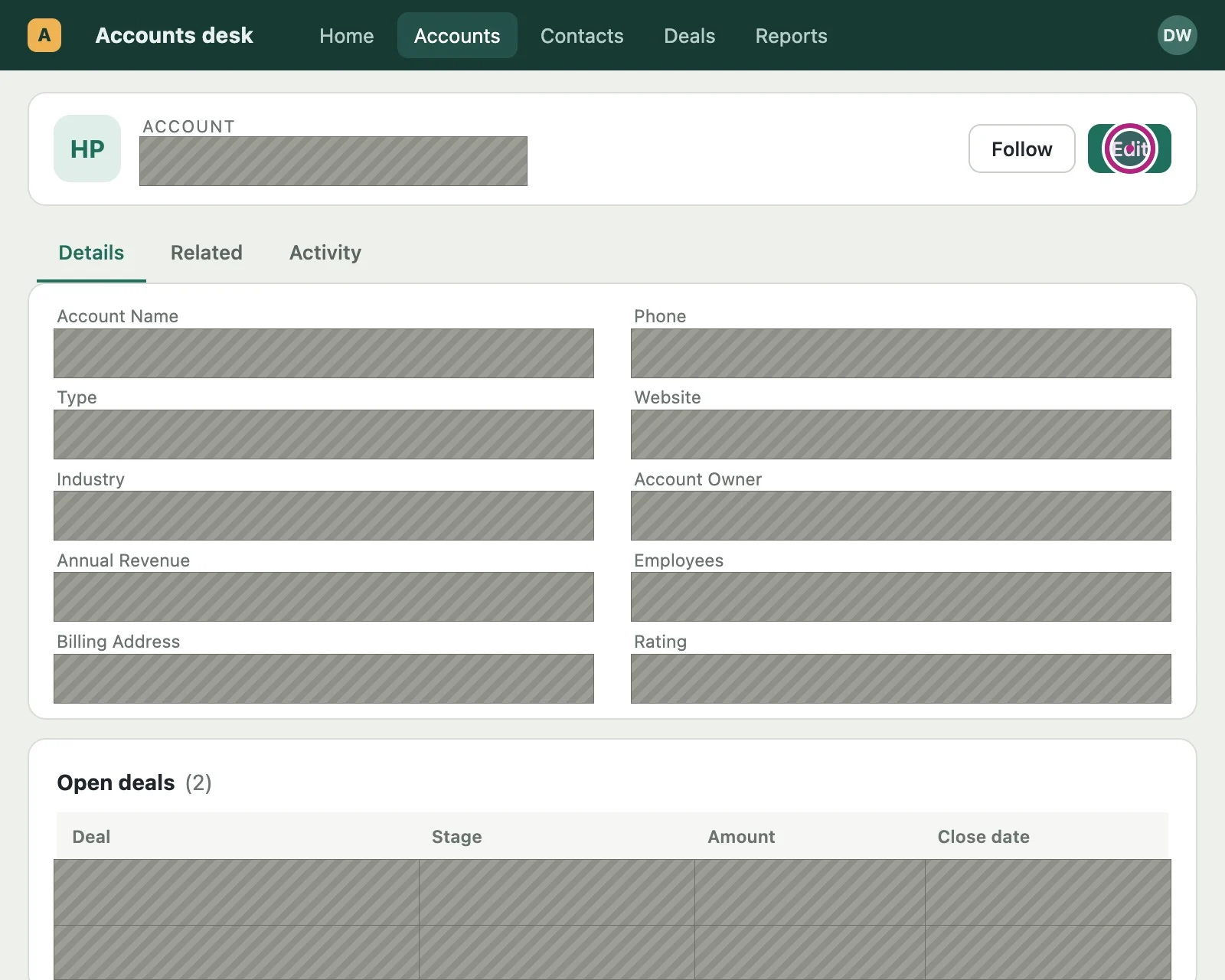
One step's picture as an export carries it: every field value covered by a striped mask, and a ring marking the Edit button that was clicked
One step's picture, as the export carries it: field values covered, the click marked.

The page editor: arrange it, mark it up, hand it over.

Lay the steps out on pages, draw on the pictures, and export the format the reader wants.

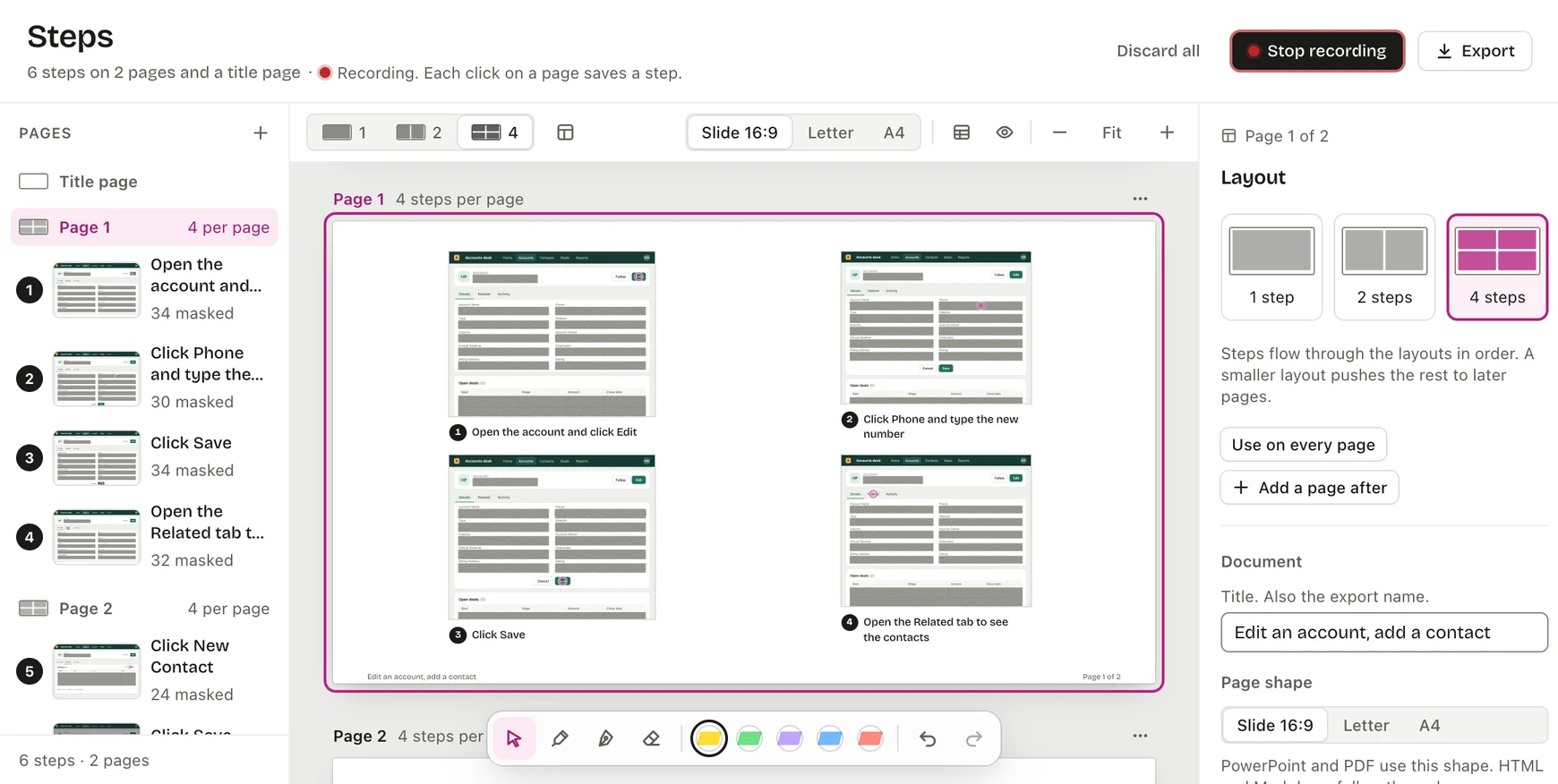
The page editor with four steps arranged on one slide and the 1, 2 and 4 steps layouts beside it
PAGES

1, 2 or 4 steps per page

Arrange steps on pages sized as a slide, Letter or A4, with 1, 2 or 4 steps on each.

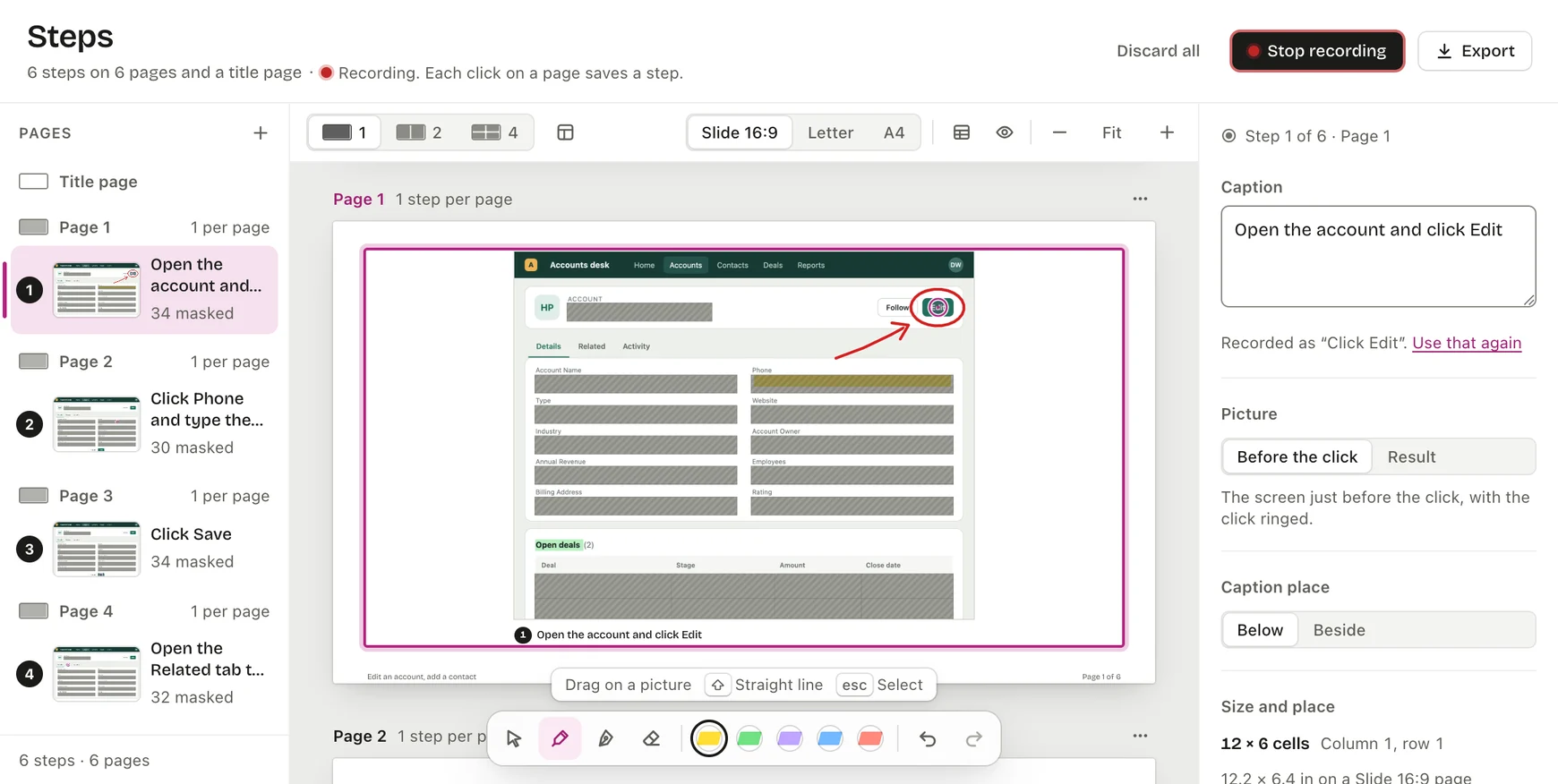
The page editor with a highlighter stroke and a pen arrow drawn on a step, and the tools dock below
DRAWING TOOLS

Highlighter, pen and eraser

Point at the thing that matters with a highlighter or a pen, rub it out with the eraser, and add your own masks. Undo when you change your mind.

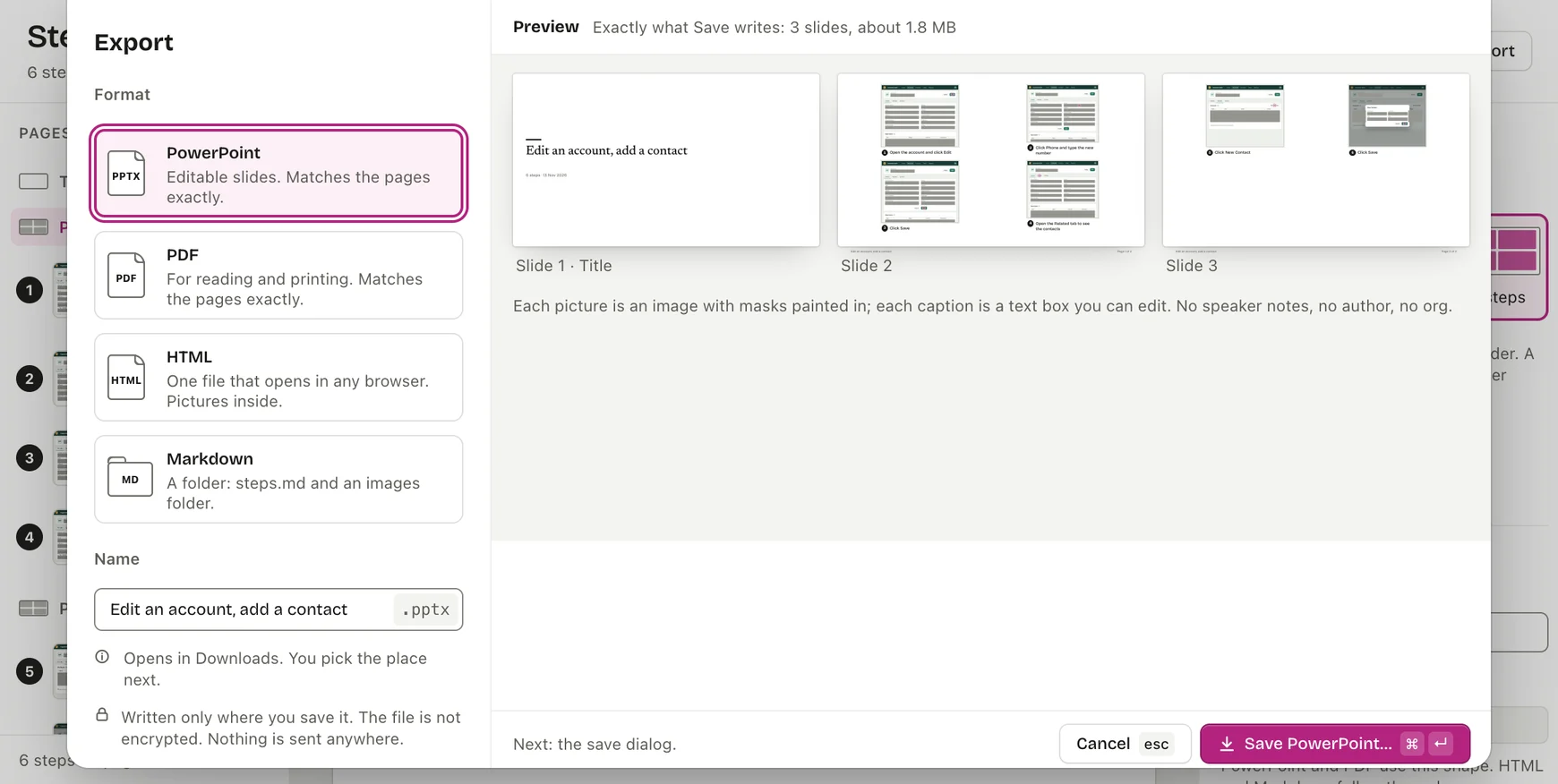
The export sheet: PowerPoint, PDF, HTML and Markdown, with a preview of the slides
EXPORTS

PowerPoint, PDF, HTML and Markdown

HTML and Markdown are in the free version. PRO adds PowerPoint and PDF, laid out the way you arranged the pages.

Numbered stepsBefore and after picturesCaptions from labels MasksSlide, Letter, A4PowerPointPDFHTMLMarkdown

The fourth in the family.

Marco finds where it's used. Polo finds what drifted. Magellan finds what's wrong. Steps leaves a trail: every click becomes a marked step someone else can follow.

MARCO

Where Used for Salesforce

Everywhere any component is used, as a graph, a list and a 3D universe.

Meet Marco →

POLO

Org Compare for Salesforce

Same, different, or missing in another org you're logged into.

Meet Polo →

MAGELLAN

Best-Practices Analyzer for Salesforce

Ranked best-practice findings for any Apex class, trigger, Flow or LWC.

Meet Magellan →

Free to record. PRO when you want the pages.

Recording is free, for good. PRO adds the page editor and the office formats: one key, one payment, no subscription.

Free

$0
forever
  • Record clicks as numbered steps
  • Captions written from the label
  • Field values masked by default
  • Edit steps and captions
  • Export HTML and Markdown
  • A free export carries the first 12 steps and ends with "Made with Steps for Salesforce"

PRO

$19
one-time, yours for good
  • Everything in Free
  • The page editor: 1, 2 or 4 steps per page; slide, Letter or A4
  • Highlighter, pen, eraser and your own masks
  • Export PowerPoint and PDF
  • No 12-step limit, and no "Made with Steps" line
  • See it first: a walkthrough inside the extension shows what PRO adds
Buy PRO — $19

Team packs

$79
one-time · 5 seats
  • PRO for the whole team
  • 5 seats: $79
  • 10 seats: $149
  • One payment, no subscription
Buy a team pack

Pick 5 or 10 seats at checkout.

Everything stays in the browser.

No account, no cloud, and nothing installed in your org.

  • Pictures stay in the extension's memory. They live there until you export them, and they are gone when the panel closes. Nothing is uploaded, because there is nowhere to upload it to.
  • No Salesforce API calls. Steps looks at the page you are on to see what was clicked and to cover field values. It does not query your org.
  • No accounts, and nothing about your org on our servers. The only server Steps ever contacts is our license server. Activating a PRO key carries just the key and a random install ID.
  • No analytics. We don't know when you install it, open it, or what you record.
  • Nothing installed in your org. No connected app, no OAuth, no package.

Read the full privacy policy →

Steps is on Microsoft Edge and Firefox.

Add it from the Edge Add-ons store or from Firefox Add-ons. Chrome is on the way. Want a heads-up when it lands, or have a question? A short email is enough: what you document today, who reads it, and which format they want it in.

[email protected]