Org Compare for Salesforce Coming soon

Polo Same, different, or missing — in every org, at a glance.

A Chrome side panel that lives next to Setup. Click a component and Polo tells you whether it's identical, different, or missing in every other org you're logged into — then shows you who changed it, and when. No login, no connected app: if you're signed into the org in Chrome, Polo can see it. Read-only, and your metadata never leaves your browser.

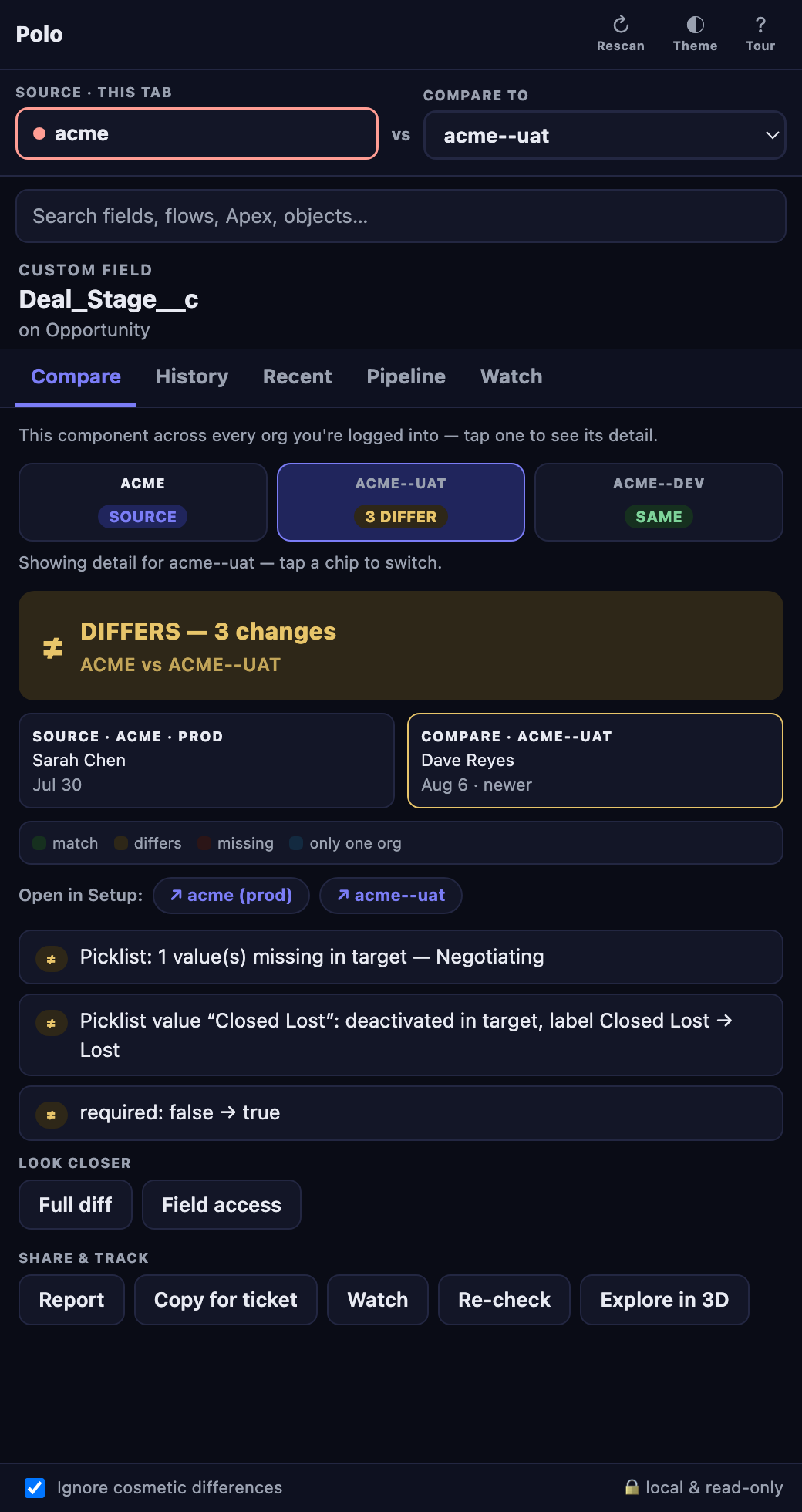
Polo side panel: Deal_Stage__c compared across three orgs — verdict chips per org, DIFFERS with 3 changes spelled out as sentences
The Compare tab: verdict first, changes as sentences, who touched it last.

The side panel is the product.

Three tabs do the everyday work. Open Polo next to Setup and it follows whatever you click — no copy-pasting API names, no second window.

Compare tab
COMPARE

Same, different, or missing — per org

Focus a field, flow, class, rule, layout, or page and Polo compares it against every org you're logged into. One chip per org; tap it for the detail. Every change reads as a plain sentence — “required: false → true”, “picklist value missing in target — Negotiating” — with a full diff one click away. The History tab merges audit trail, flow versions, and Polo's own snapshots into a who-changed-what timeline for both orgs.

Pipeline tab
PIPELINE

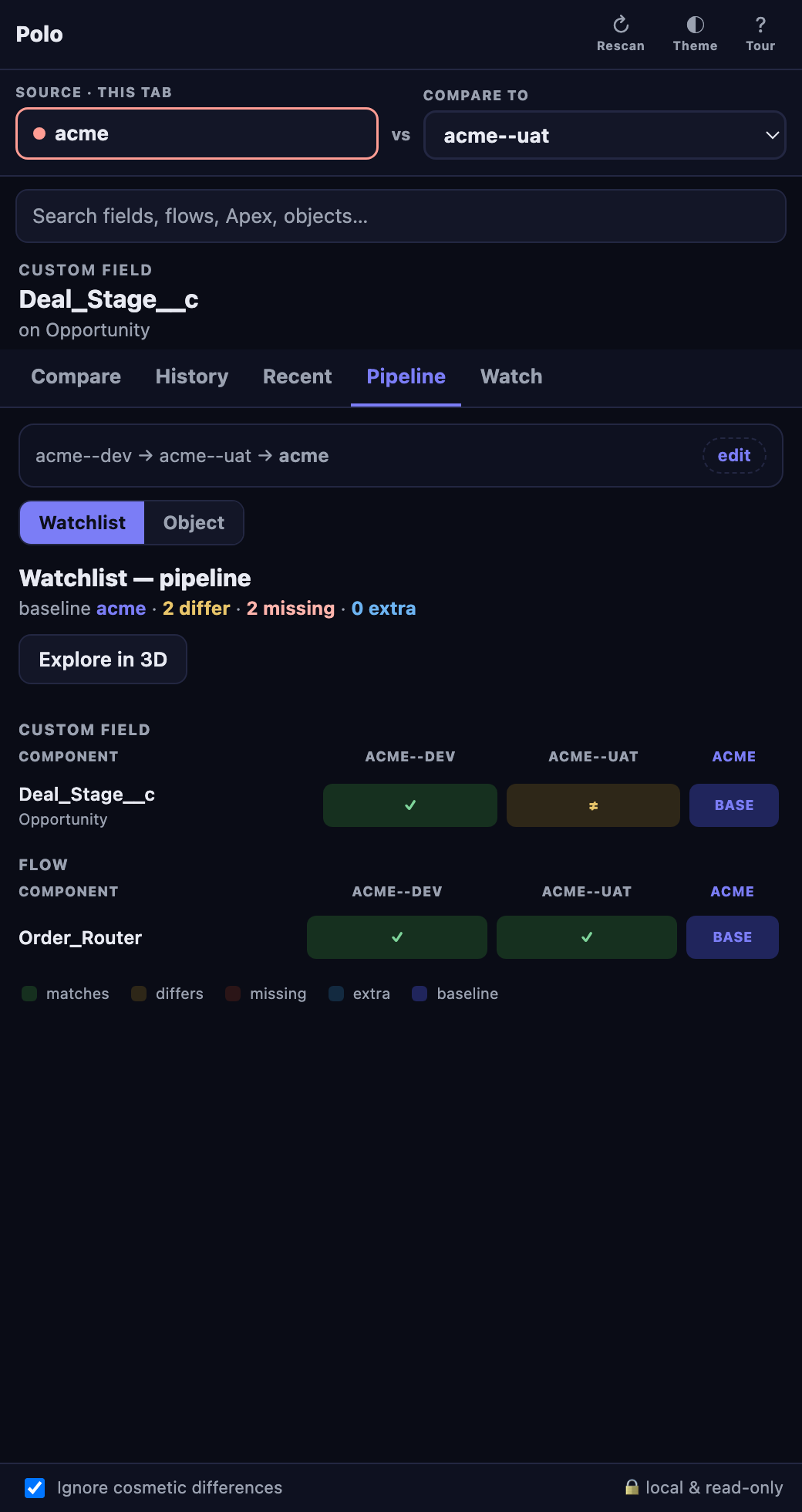
Your whole release path in one grid

Dev → UAT → Prod (or whatever your path is): components down, orgs across, each cell same / differs / missing / extra against a baseline you choose. Feed it your watchlist for a release check, or point it at an object for a full inventory sweep — fields, rules, layouts, triggers, actions. Click a cell to land in Compare with that org selected.

Watch tab
WATCH

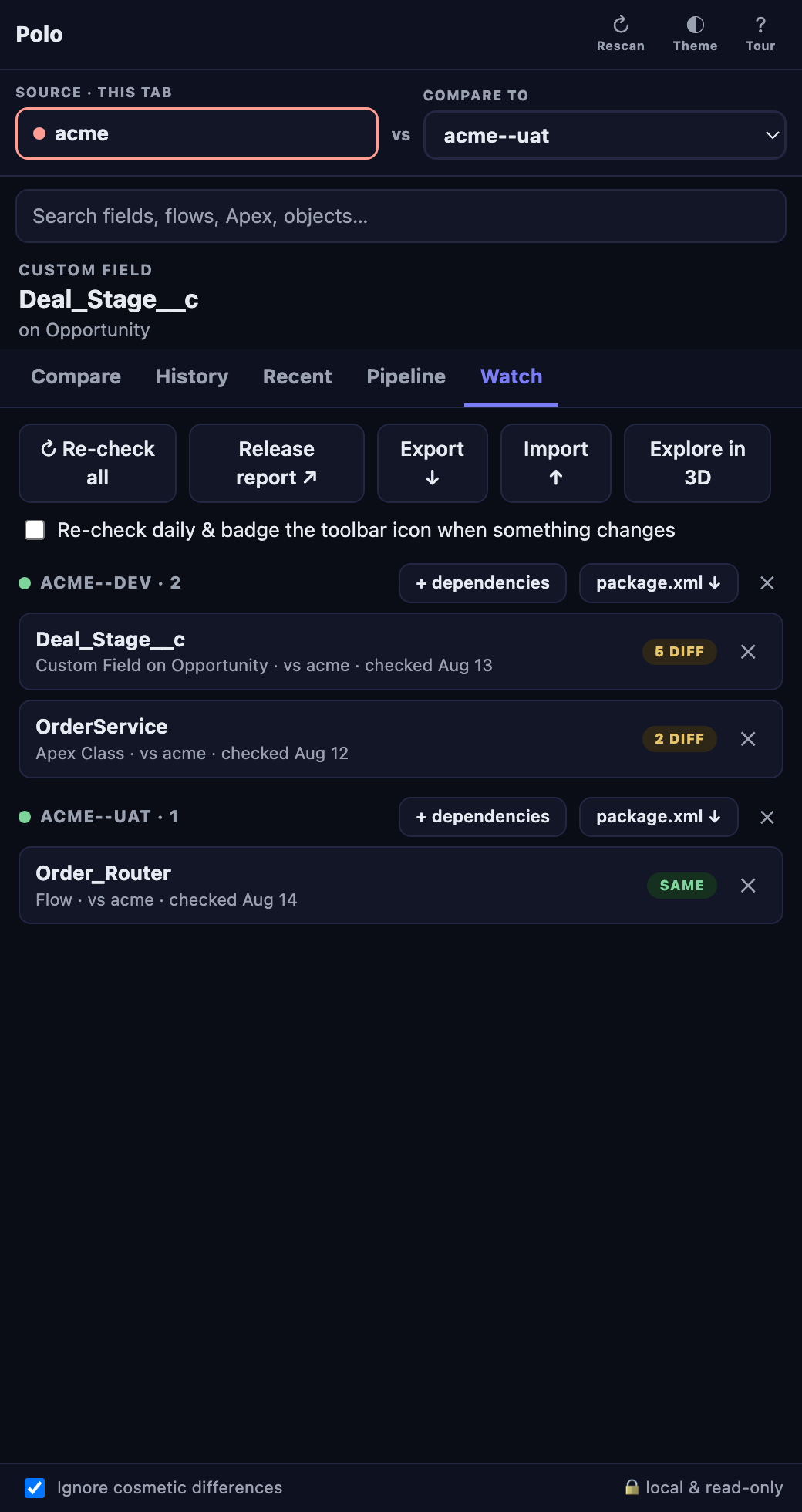
Pin what's in flight, know when it drifts

Watch anything from Compare. Grouped by source org with a verdict badge per row. + dependencies pulls in everything a component needs (recursively). Re-check all refreshes verdicts; turn on the daily re-check and Polo badges its toolbar icon when something drifts. Export a package.xml per org, a print-ready release report, or the whole list as JSON.

From “it's different” to “here's the deploy.”

Polo won't deploy for you — that's the point — but it hands you everything the person who does will need.

PACKAGE.XML

A manifest per source org, one click

Every watchlist group has a package.xml ↓ button. Polo writes a Metadata API manifest for exactly those components — fields as Object.Field__c, layouts as Object-Layout, Apex and flows bare — and shows you the retrieve command to run:

sf project retrieve start -x acme-package.xml -o acme

Types the Metadata API can't round-trip cleanly get a note instead of a silent gap. Retrieve from source, deploy to target, with your normal tooling and your normal approvals.

EXPORT / IMPORT

Your watchlist is a file

Export ↓ saves the whole watchlist — every component, its source and target org, and the last verdict — as polo-watchlist.json. Import ↑ restores it on another machine, or hands it to a teammate: same list, same org pairing, verdict badges intact, no re-check needed. Imports merge, they don't overwrite.

Use it as the release manifest for a sprint, a shared checklist between admin and dev, or just insurance against a fresh browser profile.

REPORTS

Something to attach to the ticket

Release report ↗ turns the watchlist into a print-ready go/no-go table, action-needed rows first. On any single compare, Report opens a paper-style page of the diff and history, and Copy for ticket puts a Markdown summary on your clipboard for Jira, Slack, or the PR description.
No login. No connected app. Any two orgs.

Polo rides on the Salesforce sessions you already have in Chrome. That turns out to matter more than it sounds.

SIGN IN LIKE ALWAYS

Nothing to install in the org

No connected app, no OAuth dance, no package, no API user to provision. Log into Salesforce in Chrome the way you already do — every org you're signed into shows up in Polo's org picker.

UNRELATED ORGS

They don't have to be a sandbox and its prod

Polo matches components by API name, never by ID, so the two orgs don't need to be related at all. Two customers on different stacks, an old org and the one replacing it, a client's prod against your reference org — if you can log into both, you can compare them.

READ-ONLY, LOCAL

Look, don't touch

Polo only ever reads. Metadata is fetched from your browser straight to your orgs and stays there — no servers, no accounts, no telemetry.

The question it answers: “is this the same in prod?”

Polo is for admins, architects, and release managers who are tired of opening two Setup tabs side by side and squinting.

COMPARE

One click, every org

Focus a field, flow, class, rule, layout, or page in Setup. Polo compares it against every org you're logged into and shows a verdict chip per org — tap one for the exact differences, in sentences, not raw XML.

TATTLE TRAIL

Who changed it, and where first

Setup Audit Trail, flow versions, and Polo's own snapshots merged into one history per org. It's deployment-aware: prod changing after sandbox is normal; prod changing on its own is a red banner.

PIPELINE

The whole pipeline in one matrix

Components × orgs versus a baseline: same, differs, missing, extra. Watchlist scope for your release, or object scope for a full inventory sweep.

WATCHLIST

Watch it, re-check it, ship it

Pin what's in flight. One-click dependency scan pulls in everything it needs. Daily re-check with a badge when something drifts. Export a package.xml or a print-ready release report.

DEEPER

Object scans, FLS, perm sets

Scan a whole object across orgs. Diff one field's read/edit across every profile and permission set. Compare a permission set's CRUD grid. Flow version-to-version diff, even inside one org.

EXPLORE IN 3D

Spin the disc, dive into time

Every difference on a spinnable disc grouped by type. Click the front card and it becomes the top of a history deck — scroll into the past until you hit the version that matches your target org.

Custom & standard fieldsValidation rulesFlows Apex classes & triggersPage layoutsLightning pages Record typesQuick actionsVisualforceLWC & Aura Email templatesDuplicate & matching rulesCustom labels Permission setsTabs, apps, list viewsNamed credentials…and more

Explore in 3D

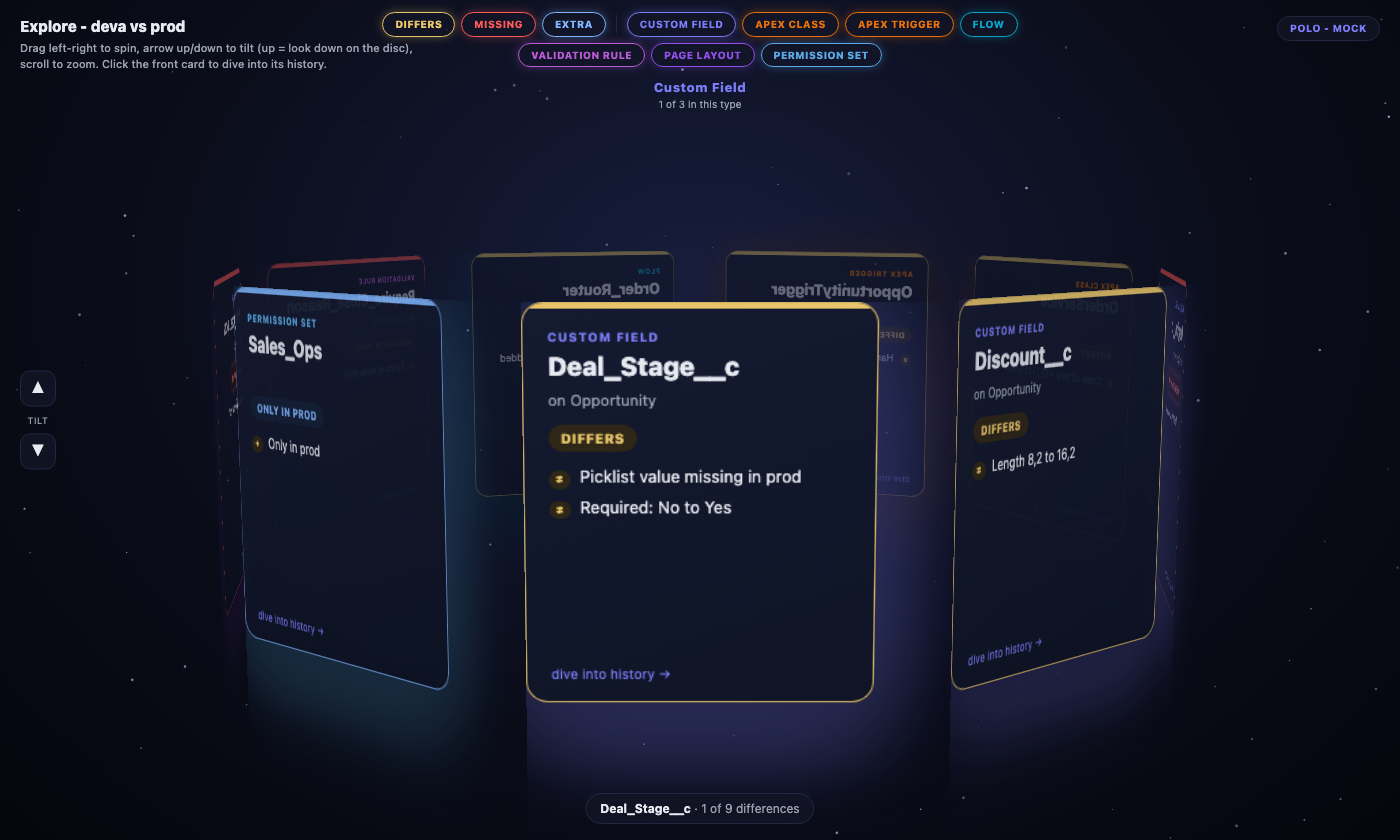
When the list gets long, spin it. Every difference on one disc, grouped by type.

Polo's Explore in 3D view: a spinnable disc of every difference between two orgs, cards grouped and glowing by metadata type
Every difference on one disc. Glow is the metadata type; gold and red edges are the verdict.
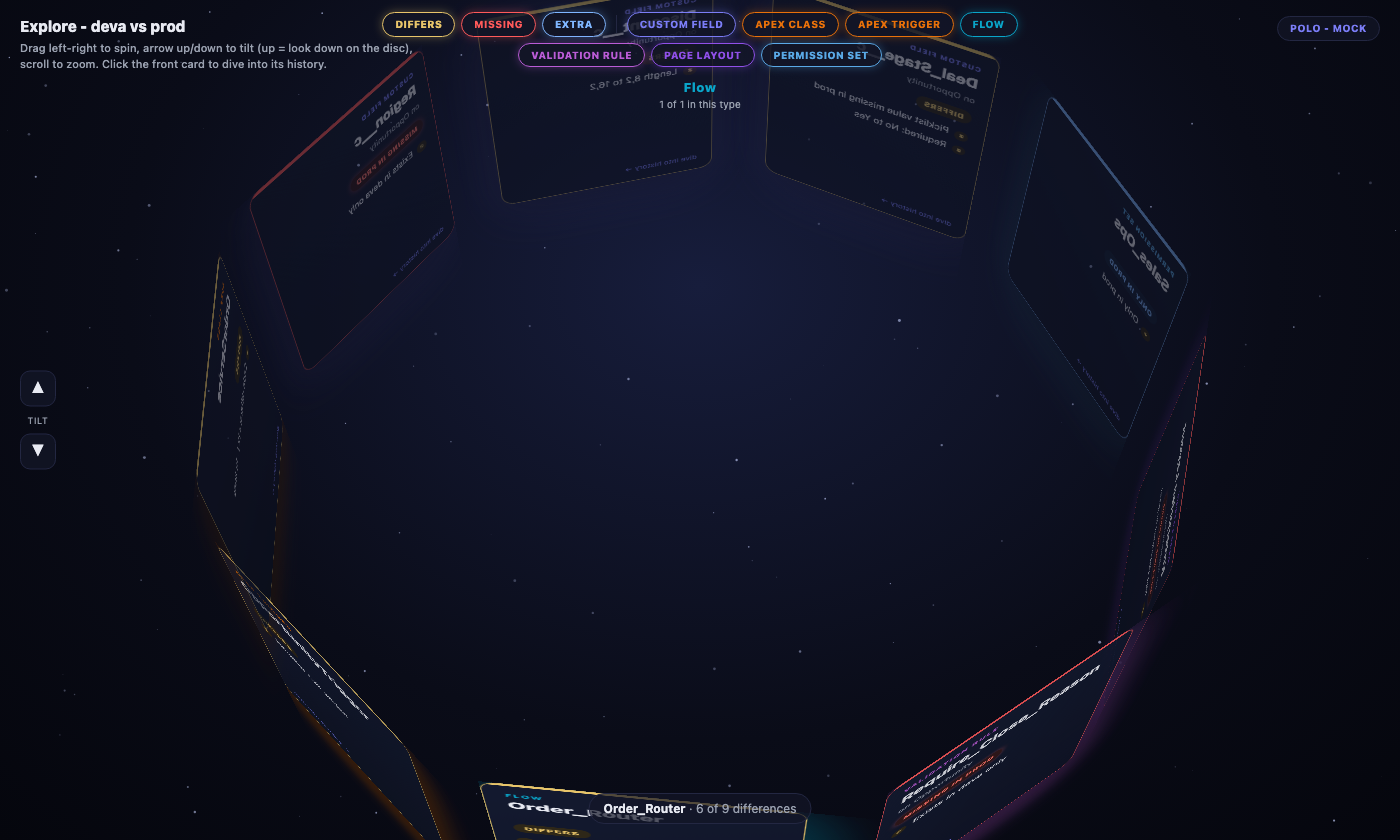
Polo's 3D disc viewed from directly above, showing every component's metadata type as a colored glow
Tilt to look straight down and the disc becomes a type map.

Text first, 3D second: names and verdicts are always readable, the space is just how you move through them.

  • Glow is the metadata type. Look down on the disc and you see the shape of your release — how much is fields, how much is Apex, how much is flow.
  • Edges are the verdict. Gold differs, red missing — the missing pill pulses.
  • Filters are the key. Toggle severity and type chips; the disc rebuilds.
  • Dive into history. The front card is the top of a deck of snapshots. Scroll and it slides away, revealing the past — the green one matches prod.

Read-only isn't a setting. It's the product.

Polo never writes to an org, and your metadata never leaves your browser.

  • No deploys, ever. Polo emits a package.xml and a ready-to-run sf command — you run the retrieve or deploy. Polo's own network layer is hard-wired to GET.
  • No servers, no accounts. The only calls are from your browser to your own orgs' APIs, using the sessions you already have.
  • No telemetry. We don't know when you install it, open it, or what orgs you point it at.
  • Nothing installed in your org. No connected app, no OAuth, no package.

Read the full privacy policy →

Polo is coming soon.

Chrome Web Store listing is on the way. Want in early, or a heads-up when it lands? A short email is enough — how many orgs, what your release process looks like, and what you'd want to see side by side first.

[email protected]